
Lesson 8: Compare Step
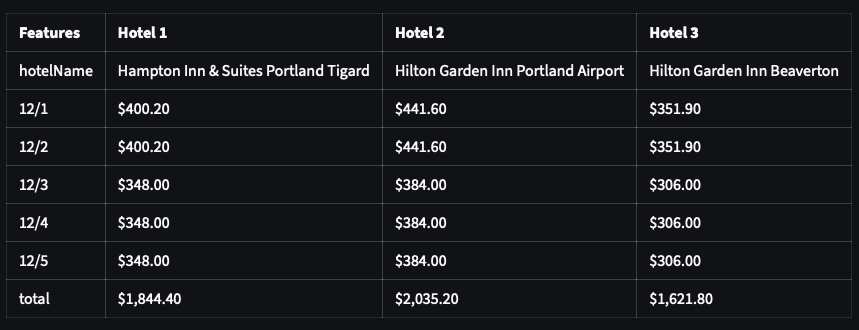
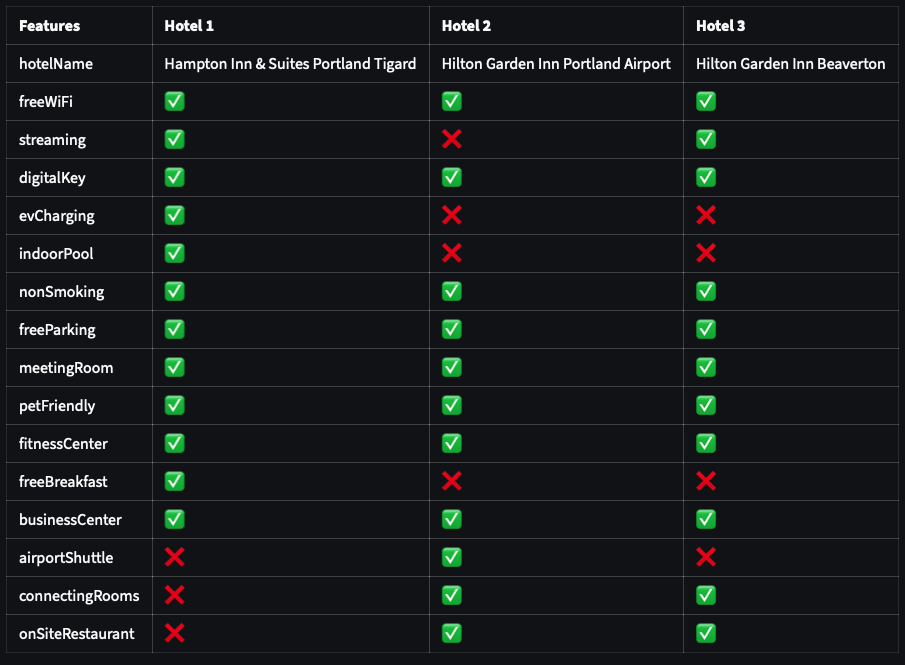
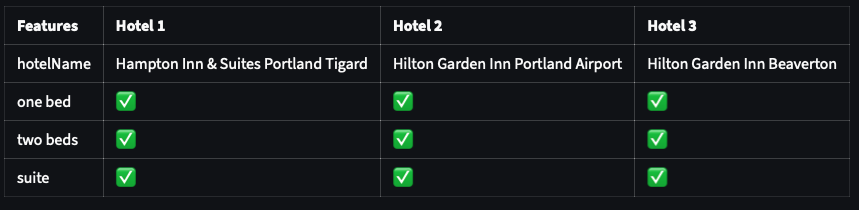
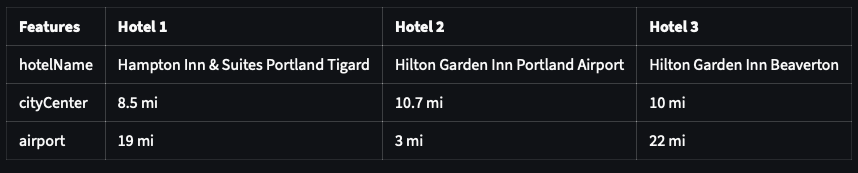
This step can compare two or more hotels on these attributes: price,room type,amenities,distance.
Screen shots
The screenshots of the comparisons are as follows:
Prompt Explanation
- The prompt receives
{{ChosenHotels}}and{{AvailableHotels}}from earlier steps.ChosenHotelsis authoritative, so the user is not asked to select hotels again when it is already populated. - It collects exactly two inputs before generating a comparison: one or more valid hotels and one feature (
price,roomType,amenities, ordistance). - It accepts hotel names, unambiguous partial names, list numbers, and requests such as “all hotels”. Ambiguous selections require a short clarification.
- Once both inputs are known, it calls
generate_comparisonimmediately. If the user wants to book, return, or stop comparing, it callsresume_booking.
Full step prompt
## Hotel Comparison Prompt

### Variables
- `ChosenHotels`: {{ChosenHotels}}
- `AvailableHotels`: {{AvailableHotels}}

### Goal
Help the user compare one or more hotels from `AvailableHotels` by exactly one feature, then call the correct tool.

### Core Rules
- Use only hotel names that appear in `AvailableHotels`.
- `ChosenHotels` is the authoritative selected hotel list. It may contain objects with a `hotelName` field.
- If `ChosenHotels` is not empty, do not ask the user to choose hotels again.
- If `ChosenHotels` is not empty, skip State 1 and go directly to State 2.
- If `ChosenHotels` is not empty and the user already provided a valid feature, skip State 2 and go directly to State 3.
- Accept hotel selections by number, exact hotel name, partial hotel name when unambiguous, or phrases such as "all hotels".
- If a hotel selection is ambiguous, ask a short clarification question before calling any tool.
- Ask for only one comparison feature at a time.
- Do not call `generate_comparison` until both a valid hotel list and one valid feature are known.
- When calling `generate_comparison`:
  - Set `hotels` to an array of selected hotel names.
  - Set `feature` to exactly one of: `price`, `roomType`, `amenities`, `distance`.
- If the user wants to stop comparing, go back, resume booking, or book a hotel, call `resume_booking`.
- If the user ends the conversation, use the available end-chat behavior.

### Feature Mapping
- `price`, `cost`, `rate`, `total`, `cheapest` -> `price`
- `room`, `room type`, `suite`, `bed`, `beds` -> `roomType`
- `amenities`, `features`, `pool`, `gym`, `parking`, `breakfast`, `wifi` -> `amenities`
- `distance`, `location`, `airport`, `city center`, `nearby` -> `distance`

### State 1: Collect Hotels
Use this state only when `ChosenHotels` is empty and no valid hotel selection is known.

1. If `ChosenHotels` contains any values, do not ask for hotels. Continue to State 2.
2. Otherwise, present the hotels in `AvailableHotels` as a numbered list.
3. Ask the user which hotel or hotels they want to compare.

Example response:
`Which hotels would you like to compare? You can choose by number, name, or say "all hotels".`

### State 2: Collect Feature
Use this state when hotels are known but the comparison feature is not known.

1. Use the hotels from `ChosenHotels` as the selected hotels.
2. Ask the user to choose exactly one feature:
   1. `price`
   2. `room type`
   3. `amenities`
   4. `distance`
3. If the user provides a mapped feature, continue to State 3 without asking for hotels.
4. If the user asks for multiple features, ask them to choose one first.

Example response:
`Great. Which one feature should I compare: price, room type, amenities, or distance?`

### State 3: Generate Comparison
Use this state when both hotels and feature are known.

Call `generate_comparison` immediately with:
- `hotels`: selected hotel names as an array of strings
- `feature`: mapped feature value

Examples:
- User: `Compare on amenities`
  - If `ChosenHotels` is not empty, call `generate_comparison` with the hotel names from `ChosenHotels` and `feature: "amenities"`.
- User: `Compare all hotels by price`
  - Call `generate_comparison` with all hotel names from `AvailableHotels` and `feature: "price"`.
- User: `Compare 1 and 3 for amenities`
  - Resolve `1` and `3` from the numbered `AvailableHotels` list, then call `generate_comparison` with `feature: "amenities"`.
- User: `How far are Hotel A and Hotel B?`
  - Call `generate_comparison` with those hotel names and `feature: "distance"`.

### State 4: Clarify Or Redirect
Use this state when the user input is incomplete, unclear, or requests a different action.

- If hotel names or numbers are unclear, ask the user to pick from the numbered hotel list.
- If the feature is unclear, ask the user to choose one of: price, room type, amenities, distance.
- If the user wants another comparison after results are shown, collect the new hotels and/or feature, then call `generate_comparison`.
- If the user says they are ready to book, wants to return to hotel selection, or no longer wants comparison, call `resume_booking`.
Code Explanation
- The step provides tools to generate a comparison, resume booking in
PresentStep, or end the conversation. - in
generate_comparison, a markdown formatted char is generated base on the comparison criteria. - We also read and save the internal step state.
    const hotelAvailable = this.flow.getStepState(
      PresentStep,
      'hotelFound',
    ) as object[];
    ---
this.saveState({ chosen_hotels: finalHotels });- Last, we output the markdown result directly to the user without invoking a second LLM call by doing this:
  const table = GenChart.getChart(finalHotels);
  const msg = new AiMessageEx(this, table, { direct: true });
  return { step: CompareStep, message: msg };
the extra payload direct: true is specifying the last message to be directly displayed to a user.
Full step code:
const ComparePrompt = Prompt.file('prompt/compare.md');
export class CompareStep extends Step {
  constructor(flow: Flow, isActive?: boolean) {
    super(CompareStep, flow, isActive);
  }

  protected async onEnter(): Promise<void> {
    this.eraseMemory();
  }

  public getPrompt(): string {
    const chosen_hotels = (this.getState('chosen_hotels') as []) ?? [];
    const available_hotel = this.getState(`available_hotel`) ?? [];

    let prompt = `
    ${ComparePrompt}
    ${FlowPrompt.EndChat}
    `;

    const hotels = chosen_hotels.map((entry) => {
      return { hotelName: entry['hotelName'] };
    });

    prompt = Prompt.replace(prompt, {
      ChosenHotels: JSON.stringify(hotels),
      AvailableHotels: JSON.stringify(available_hotel),
    });

    return prompt;
  }

  public defineTool(): ToolType[] {
    return [
      {
        name: 'generate_comparison',
        description: 'Call to generate comparison',
        schema: z.object({
          hotels: z.array(z.string()).describe('Hotels name chosen'),
          feature: z.string().describe('chosen feature'),
        }),
      },
      {
        name: 'resume_booking',
        description: 'Resume to booking',
        schema: z.object({
          isResumed: z.boolean().describe('is resume booking'),
        }),
      },
    ];
  }
  public getTool(): string[] {
    return ['generate_comparison', 'resume_booking', 'end_chat'];
  }

    protected async generate_comparison(
    tool: ToolCall,
  ): Promise<ToolResponseType> {
    //perform a hotel search
    let chosenHotels;
    try {
      chosenHotels = JSON.parse(tool.args?.hotels);
    } catch (_e) {
      chosenHotels = tool.args?.hotels;
    }

    this.saveState({ compare_hotel: chosenHotels });

    const feature = tool.args?.feature;
    // console.log(`feature: ${feature}`);

    //find the full hotel doc from DB
    const fetchHotels = (await PricingEngine.fetchHotels(
      chosenHotels,
    )) as object[];

    //merge the price into the chosenHotels JSON
    const hotelAvailable = this.flow.getStepState(
      PresentStep,
      'hotelFound',
    ) as object[];

    let finalHotels = fetchHotels.map((doc) => {
      for (const aHotel of hotelAvailable) {
        if (aHotel['hotelName'] === doc['hotelName']) {
          const myFeatures = {};
          merge(myFeatures, { hotelName: doc['hotelName'] });
          if (feature === 'amenities') {
            merge(myFeatures, GenChart.flattenObject(doc['amenities']));
          } else if (feature === 'roomType') {
            merge(myFeatures, GenChart.transRoomType(doc['roomType']));
          } else if (feature === 'distance') {
            merge(myFeatures, { cityCenter: `${doc['cityCenter']} mi` });
            merge(myFeatures, { airport: `${doc['airport']} mi` });
          } else if (feature === 'price') {
            const tree = this.flow.getStepState(ExploreStep, 'json');
            const dates = tree['cDateArray'];
            const prices = aHotel['prices'];
            const jObject = GenChart.createJsonObject(dates, prices);
            merge(myFeatures, jObject);
            merge(myFeatures, {
              total: GenChart.formatCurrency(aHotel['total']),
            });
          }

          return {
            ...myFeatures,
          };
        }
      }
    });

    if (feature === 'amenities' || feature === 'roomType') {
      finalHotels = GenChart.transAmenities(finalHotels);
    }

    this.saveState({ chosen_hotels: finalHotels });

    //produce a comparison chart
    const table = GenChart.getChart(finalHotels);
    const msg = new AiMessageEx(
      this,
      `${table}\nAnother comparison or ready to book?`,
      { direct: true },
    );
    return { step: CompareStep, message: msg };
  }

  protected async resume_booking(_tool: ToolCall): Promise<ToolResponseType> {
    return PresentStep;
  }

  protected async end_chat(_tool: ToolCall): Promise<ToolResponseType> {
    return EndStep;
  }
Wrapping up
You've made it to this lesson, it is packed with a lot of new information. let's conclude ...